Note about SSH

SSH aliases makes your life easier if :
- You are using SSH frequently. You probably don’t want to type long command lines, especially if you are using authentication keys.
- You have multiple GitHub accounts.
SSH aliases are defined within the file ~/.ssh/config. In the snippet below we define an alias:
Host hostAlias
    HostName host.example.com
    user svn
    Port 22
    IdentityFile ~/.ssh/host.example.com
    IdentitiesOnly yes
IdentitiesOnly".
Now, the command ssh hostAlias is equivalent to the command ssh -i ~/.ssh/host.example.com -p 22 svn@host.example.com.
If you have multiple GitHub accounts, aliases are the best solution to handle SSH keys. Let’s say that you have two GitHub accounts:
- joe. This account is associated with the SSH key
~/.ssh/joe.on.github - bill. This account is associated with the SSH key
~/.ssh/bill.on.github
The problem arises when you need to specify the URI to your repositories:
git@github.com:joe/youRepos.gitgit@github.com:bill/youRepos.git
... same user (git), same host (github.com)!. Damn it!
There are various solutions to handle this situation. But the best solution I found is to use SSH aliases. You define one SSH alias for each user (Joe and Bill), and then you specify these aliases into the repositories' URIs. Because the GIT client uses the SSH client, the aliases will be replaced by their definitions.
Example (~/.ssh/config):
host joe.github.com
    HostName github.com
    User joe
    PreferredAuthentications publickey
    IdentityFile ~/.ssh/github_joe
    IdentitiesOnly yes

host bill.github.com
    HostName github.com
    User bill
    PreferredAuthentications publickey
    IdentityFile ~/.ssh/github_bill
    IdentitiesOnly yes
Now the repositories' URI become:
git@joe.github.com:joe/youRepos.gitgit@bill.github.com:bill/youRepos.git
git remote set-url origin git@joe.github.com:joe/youRepos.git.
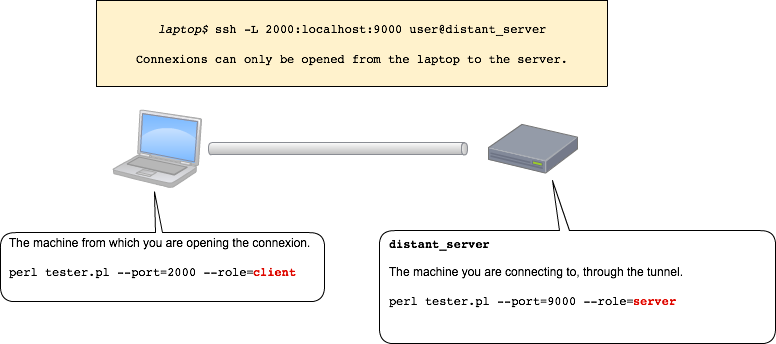
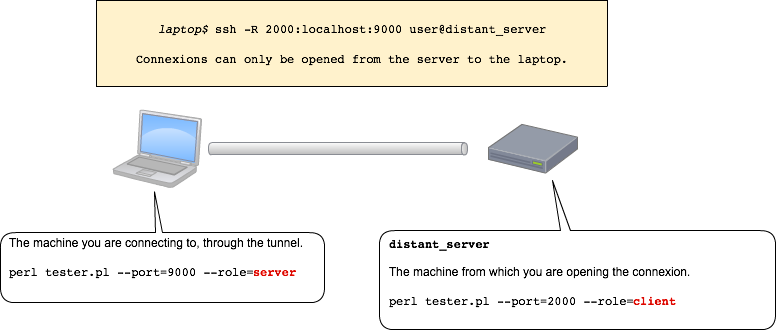
SSH tunnels configuration is always confusing. You wonder what "localhost" means.
- Does it identify the "local" server, you are logged in right now ?
- Does it identify the "remote" server ?
As a picture says a thousand words:
Below, the Perl script used to test the tunnel.
Well, what is "localhost" ?
This question is confusing because we are adopting the wrong point of view. We adopt "our" point of view... which is a very pertinent point of view whatsoever. However, we should adopt the point of view of the "processes" (that opens the connexions). Whether we are looking at the process on the laptop or the process on the server, both processes open connexions to "localhost" (on different ports, however, in our example). Therefore "localhost" does not, physically, identify one end of the tunnel (the laptop or the server, in our example). It identifies both ends, from two distinct points of view.
I don't know about you, but I'd rather not type these long command lines. That's why I use SSH aliases for tunnels (whithin ~/.ssh/config).
Host tunnelAlias
    HostName distant_server
    User user
    Port 22
    IdentityFile ~/.ssh/distant_server
    LocalForward 2000 localhost:9000
ssh tunnelAlias is equivalent to ssh -i ~/.ssh/distant_server -L 2000:localhost:9000 user@distant_server.
Host reverseTunnelAlias
    HostName distant_server
    User user
    Port 22
    IdentityFile ~/.ssh/distant_server
    RemoteForward 9000 localhost:2000
ssh reverseTunnelAlias is equivalent to ssh -i ~/.ssh/distant_server -R 2000:localhost:9000 user@distant_server.